Procreate Wood Texture Brushes
€5.00
Realistic Wood Texture Procreate Brushes
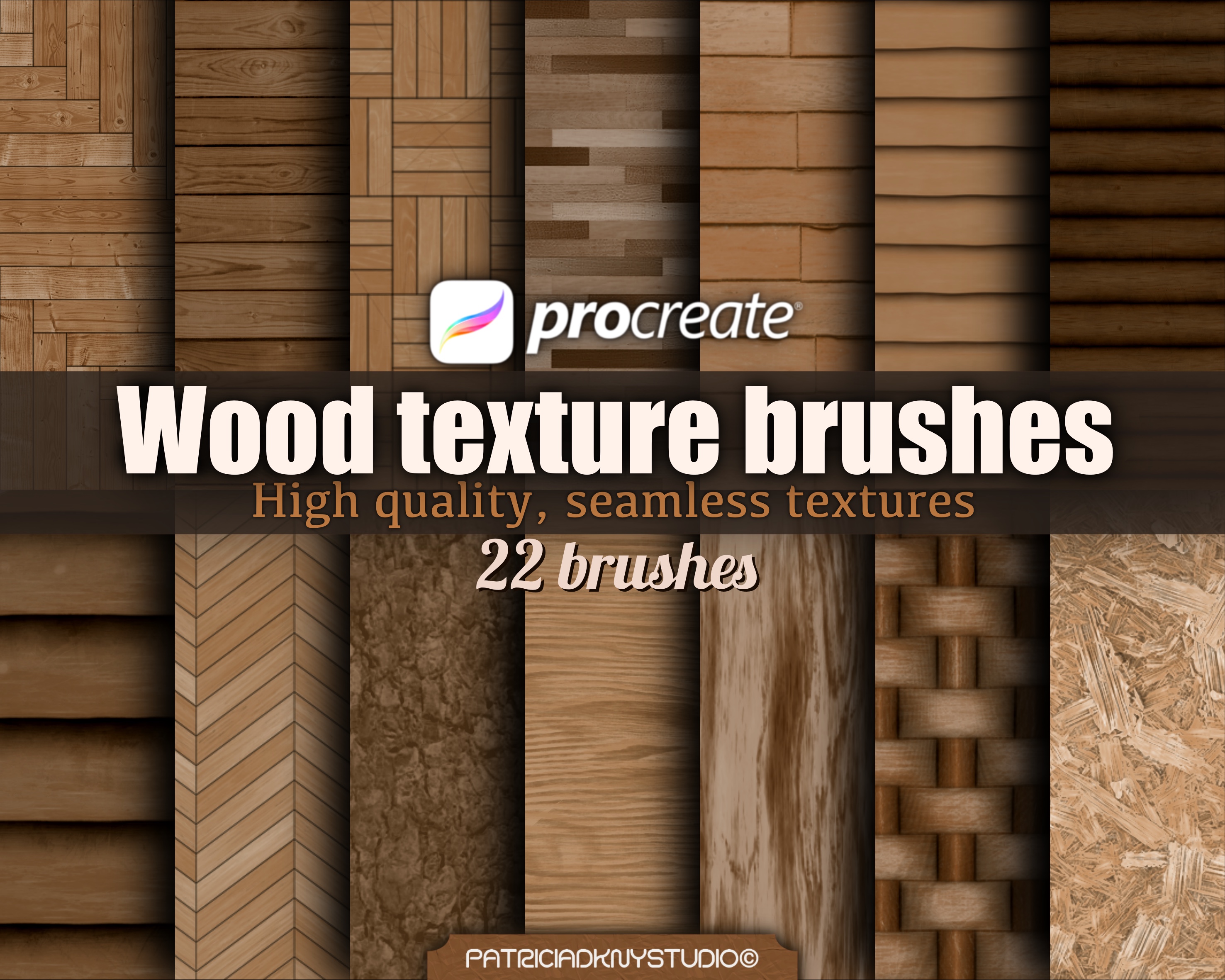
Add rich, realistic wood textures to your digital art with this versatile set of Procreate brushes! Designed for everything from interior design sketches to illustrations and surface pattern design, these brushes make it easy to create detailed, high-quality wooden effects.
This set includes a variety of wood-inspired brushes, such as:
Wood grain texture brushes
Seamless wooden parquet patterns
Tree trunk texture brushes
Interior design-friendly texture tools
Each brush is crafted to deliver a realistic, high-resolution wood effect, with a two-step texturing process for more control and depth.
You will receive:
22 two-step brushes for texturing/ patterns in .brushset format.
NOTE! You will need a Procreate app and an iPad to use these Stamp Brushes, they will not work in Photoshop or any other application.
Please also note that this is a digital product, no physical item will be shipped.
1. How do I install Procreate brushes?
After downloading your brush file (.brush or .brushset), follow these steps:
Open the Files app on your iPad.
Locate the downloaded brush file.
Unzip/decompress the file if needed.
Tap the file, and it will automatically open in Procreate.
The brush will be added to your Brush Library under "Imported."
2. How to Download Files from a Dropbox Link (No Account Needed)
Click the link (or copy and paste it into your browser)
You’ll see a preview of the folder. Ignore any sign-in prompts—you don’t need a Dropbox account.
In the top right corner of the page (on desktop), look for the "Download" button (it might be three dots or say “Download”).
Click "Download" → then "Download as ZIP" (or it may just download automatically).
Your browser will download the folder as a .zip file, which you can open and extract on your computer.
On Mobile?
If you're using a phone or tablet and don't see the "Download" button:
Tap the three dots (...) or the “…” menu, then tap "Direct download" or "Download folder".
You're welcome to use these brushes to create and sell your own original artwork, both for personal and commercial use. However, you may not resell, share, or redistribute the brush files themselves, even if altered.
Additionally, selling the stamp designs as they are—in digital or physical formats (like clipart, sticker sheets, or coloring pages)—is not allowed.
Please use them to create something new and unique. Claiming the brushes or original designs as your own is strictly prohibited.
Because this is a digital product, all sales are final and non-refundable. Once the files are downloaded, we cannot offer returns, exchanges, or cancellations.
Please make sure you have the right software (such as Procreate) before purchasing. If you have any issues with your download or files, feel free to reach out—we're happy to help!